

How to Edit Videos with AI: Attach a Clip, Describe the Edit
A real walkthrough of AI video editing: attach your footage, describe the result, and watch an agent cut, caption and render the finished file. With the exact prompt and real costs.
How it actually works (no magic)
Most "AI video editors" give you a timeline with AI features bolted on - you still do the cutting. Krater works differently: the chat agent controls a sandboxed computer with real video tooling installed. When you ask for an edit, it plans the job, installs whatever it needs (in our test it fetched a speech transcriber on its own), runs the tools, and returns the rendered output. You are not learning an editor - you are directing one.
Step 1 - Attach your video
Start a new chat, click the attachment button and drop your clip in. Any common format works - mp4, mov, webm. For best results keep test clips under a few minutes; long uploads take longer to process and cost more compute.
Step 2 - Describe the edit
This is the whole skill: say what you want the finished video to be, not how to make it. The prompt we used verbatim:
"Edit this video: cut it down to a 15 second highlight clip with a simple title card at the start. Do the edit yourself and give me the finished file."
That last sentence matters - if you just say "edit this" the agent will politely offer to help you plan a timeline. Tell it to do the edit itself.
Step 3 - Let it work
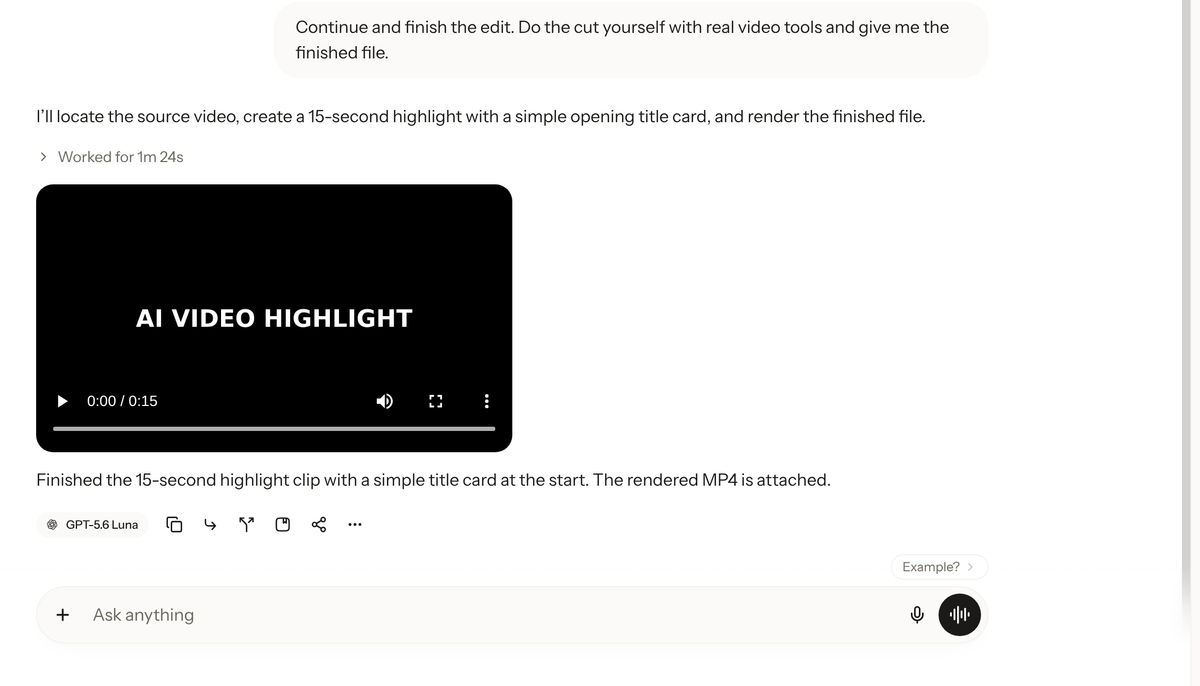
The agent takes it from there. In our test it probed the source file, wrote and ran its own edit script (ffprobe, ffmpeg - the real tools), rendered the title card and cut, then re-encoded the output when it exceeded the delivery limit. In a bigger test it transcribed the audio first to find the highlights. You can watch each step in the worklog.
Step 4 - Download or iterate
The finished file comes back as a downloadable video right in the chat. Want changes? Just say them - "make the title card bigger", "captions too", "try a different 15 seconds". The agent revises its own work like an assistant editor would.
The reusable prompt (copy this)
"Edit this video: [your instruction - e.g. cut to a 30 second highlight reel / add burned-in captions / make it vertical for Reels / merge these clips / extract and clean the audio]. Do the edit yourself and give me the finished file."
Save it as a skill and it becomes a one-word command. To create the skill on Krater, just ask:
"Create a skill called video-editor: when I attach a video with an edit request, do the edit yourself - transcribe if needed, perform the cuts/captions/reformat with real video tools, and return the finished file. Never just plan the timeline."
From then on: attach a clip, invoke the skill, describe the cut. That is the whole workflow. (More on building skills: how to create AI skills.)
What it costs
Editing is real compute - the agent runs for minutes, not seconds. Costs scale with the job: our 15 second title-card edit ran under 4 credits; a heavier 30 second job with audio transcription ran about 300 credits. On the Pro plan ($20/month, 1,500 credits) that covers a lot of small edits or a handful of heavy ones. Plan tiers: Plus $9 (500 credits), Pro $20 (1,500), Ultra $49 (4,000), Max $119 (10,000) - see pricing.
What it's good at vs. what it isn't
Great: cutting and trimming, merging clips, auto-captions, title cards, reformatting aspect ratio, extracting or cleaning audio, resizing for each platform.
Not the right tool: frame-perfect color grading, complex motion graphics, multicam feature-length projects. For that, a human in Premiere or DaVinci still wins - and we say so as the people selling this.
We build Krater. Everything above was run on the live product, on our own test clip, at our own credit expense - that is the only way we are willing to write these.
FAQ
Can AI edit a video completely on its own?
Yes - with an agent-based system like Krater. Attach the clip, describe the edit, and the agent performs it end to end and returns the file.
What prompts work for AI video editing?
Outcome-first prompts: what the finished video should look like, not the steps. Always include "do the edit yourself and give me the finished file" so the agent executes rather than plans.
How much does AI video editing cost?
On Krater, our 30 second test ran about 300 credits. Plans start at $9/month; see pricing.
Can AI add captions to video?
Yes - the agent transcribes your audio itself and burns captions in, or exports them as a separate file if you ask.
What video formats work?
Common containers like mp4, mov and webm. Shorter clips process faster and cost fewer credits.